

Your phone and smartwatch stay ready for the day when they charge in one tidy spot. Separate cables can crowd your nightstand, slip behind furniture, and leave you hunting for the right charger; a standard phone stand holds your phone but lacks watch charging.
That clutter has a practical fix: a phone watch charging station brings both devices together. Place your phone on its charging pad or connect its cable, then set your watch on its dedicated charger. You can power both in one place and keep each device easy to reach.
Many stations also charge wireless earbuds, fold for travel, or adjust to show your phone screen at a comfortable angle. A compact design frees up bedside space, while clear charging indicators help you check that devices are powered before you head out.
Stations differ in device compatibility, charging speed, size, and whether they include a power adapter, so consider what you own and where you’ll charge it. Explore the best phone watch charging stations below to find a setup that suits your routine.
8 Best Phone Watch Charging Stations Reviews
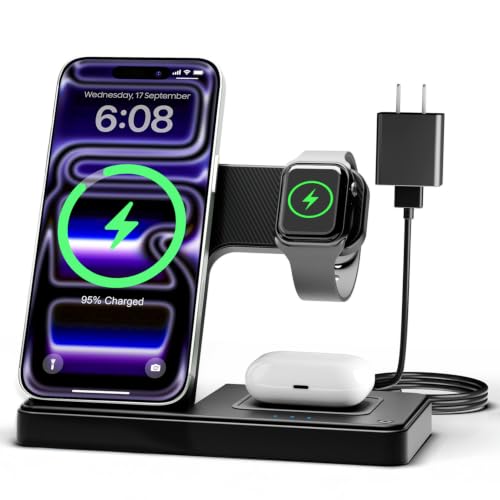
1.GETPALS W336 3-in-1 Wireless Charger Stand
Foldable, lightweight design packs easily for home, office or travel

2.Ouotoo Y888 15W 3-in-1 Charging Station
15W wireless charging powers your iPhone with built-in safety controls

3.Anlmz CW350 3-in-1 Wireless Charging Station
Charge your iPhone, Apple Watch and AirPods together in one station

4.Acer S1 7-in-1 Wireless Charging Station
30W max output charges devices while a Bluetooth clock syncs the time

5.ANJANK AC198MD 5-in-1 Charging Station
Dial-adjustable display brightness dims from 0–100% to help you sleep

6.Acer S3 3-in-1 Foldable Charging Station
Foldable, lightweight design packs easily for charging on the go

7.GAUOLN CW520 5-in-1 Wireless Charging Station
36W adapter charges up to five devices simultaneously in 2–3 hours

8.Anker Prime 25W 3-in-1 Foldable Charger
Qi2.2 delivers up to 25W, charging iPhone 18 Pro to 50% in 27 min
1. GETPALS W336 3-in-1 Wireless Charger Stand
GETPALS keeps an iPhone, Apple Watch and AirPods charging together on one foldable stand. It supplies up to 7.5W to phones, 3W to earbuds and 2.5W to watches, so you can power three devices from one station.
The charger supports iPhone models from the 8 through the 16 series, including Pro Max, Mini and SE versions. It also works with Apple Watch Series 2 through 10, SE and Ultra, plus AirPods 2, 3, 4 and Pro models.
AirPods 2, 3 and 4 need a MagSafe charging case to charge on the stand. That requirement is worth checking before you buy, especially if your earbuds use a different case.
The foldable design makes it easier to pack for trips or move between a desk and bedside table. Its black finish and non-slip surface help keep the station in place while you charge your devices.
Case compatibility extends to cases up to about 0.16 inches thick, but not cases with metal rings, pockets or magnets. Overcurrent, overvoltage and overheating protection guard the charging process, while LED indicators show charging status.
At about 0.3 pounds, it is light enough to carry in a bag. This station suits Apple users who want one compact place to charge a phone, watch and earbuds at home, at work or while traveling.
- Charges three Apple devices from one stand
- Provides up to 7.5W phone charging
- Foldable and weighs about 0.3 pounds
- Includes overcurrent and overheating protection
- AirPods 2, 3 and 4 need MagSafe cases
2. Ouotoo Y888 15W 3-in-1 Charging Station
For charging an iPhone, Apple Watch and AirPods together, the Ouotoo stand brings three wireless charging spots into one station. Its magnetic iPhone charger supports up to 15W, and the stand can charge all three devices at the same time.
The N52 magnets attach to an iPhone 12 or newer, or to a phone with a magnetic case. You can set the phone vertically or horizontally, so it can show StandBy information or play video while charging.
A blue ambient light sits in the base, and a touch sensor lets you switch it off or adjust its brightness. That gives you a small nightstand light when useful, with the option to darken the room at bedtime.
The built-in safety chip provides temperature control, over-current protection and short-circuit prevention. An indicator light shows when the phone is aligned and charging, giving you a visual cue as you place it on the stand.
The black charger weighs about half a pound. It suits people who want to charge an iPhone, Apple Watch and AirPods in one spot, especially those who value an adjustable viewing angle and a controllable bedside light.
- Charges an iPhone, Watch and AirPods together
- Up to 15W wireless charging for iPhone
- Portrait and landscape phone viewing angles
- Adjustable blue light has touch controls
- Requires a magnetic case or iPhone 12+
3. Anlmz CW350 3-in-1 Wireless Charging Station
Three devices charge on one stand: the Anlmz station powers a compatible iPhone, Apple Watch and AirPods together. Its 18W adapter comes in the box, along with a USB-C cable, so the setup needs only one cable to reach the outlet.
The charger does not use MagSafe alignment, so you need to place your phone in the center of the pad. It supports wireless-charging iPhones from the iPhone 8 onward, as well as Apple Watch Ultra 1 and 2, Series 2 through 10, and SE models.
AirPods Pro and AirPods 2, 3 and 4 also work when they have a wireless-charging case. Cases up to 5mm thick are supported, but metal items, magnets and credit cards should stay off the charging area to avoid interruptions.
A smart chipset helps guard against overcharging and switches to trickle charging once a device reaches full charge. Foreign-object detection can pause charging if it senses metal accessories, while the soft blue indicator shows charging status.
The black ABS housing supports heat dissipation during everyday charging. At about half a pound, this station suits buyers who want one compact bedside or desk setup for an iPhone, Apple Watch and AirPods.
- Charges an iPhone, watch and AirPods together
- Includes an 18W adapter for the charging setup
- Supports iPhones from the iPhone 8 onward
- Foreign-object detection can pause charging
- Phones need centering without magnetic alignment
4. Acer S1 7-in-1 Wireless Charging Station
Apple users who charge a phone, watch and AirPods together get a shared spot for their devices with the Acer station. Its 30W maximum total output supports wireless charging for an iPhone, Apple Watch and compatible AirPods case.
The stand also charges two phones wirelessly, with a built-in holder that keeps one in landscape orientation for videos, calls or recipes. It is designed for iPhones; Android phones need an additional magnetic-compatible case.
Two wired ports, USB-C and USB-A, add charging options for other devices. AirPods cases must support wireless charging and sit centered on the pad; other cases can use the wired port. Cases under about 2mm are recommended for wireless charging.
A Bluetooth connection to “S1” syncs the clock, weekday and indoor temperature. You can also adjust the clock manually using controls on the back. The display does not show indoor temperature while a phone charges wirelessly.
For a bedroom or office, the clock and night light each offer four brightness levels. The light has white, warm white and warm yellow modes, and a sensor turns it on in low light.
The black station weighs about 0.8 pounds and includes overcurrent, overvoltage and temperature protection. It suits Apple users who want a bedside charging hub with a clock and adjustable night light.
- Charges a phone, watch and AirPods together
- 30W total output plus USB-C and USB-A ports
- Landscape phone stand supports hands-free viewing
- Clock syncs time, weekday and indoor temperature
- Four brightness levels and three night-light colors
- Android phones need a magnetic-compatible case
- Clock omits temperature during wireless phone charging
5. ANJANK AC198MD 5-in-1 Charging Station
The bedroom is where the ANJANK charging station combines a phone and watch charger with an alarm clock and night light. Its magnetic wireless charger supports compatible iPhones, while the watch charger handles Apple Watch models listed by the maker.
The raised phone stand works with cases under 5 millimeters thick. The station also provides USB-C and Lightning ports for AirPods, which must connect by cable because they do not support wireless charging.
Its digital clock lets you adjust display brightness from 0 to 100 percent or turn it off. Three alarm volume levels, 12- or 24-hour time, and a 9-minute snooze give you options for setting it up beside the bed.
For nighttime use, the light offers seven colors and brightness adjustment from 10 to 100 percent, or you can switch it off. The black station weighs about 0.7 pounds, and its included 18-watt adapter powers the setup.
Compatibility is limited to Apple devices; it does not support Samsung or other Android devices. Built-in protections cover overcurrent, overvoltage, overheating, short circuits and foreign objects, making it a fit for Apple users who want charging and bedside clock functions in one station.
- Combines phone, watch, clock and light in one
- Adjustable clock brightness can turn fully off
- Seven night-light colors with dimming control
- Includes an 18-watt adapter and charging safeguards
- Not compatible with Samsung or Android devices
- AirPods need a cable rather than wireless charging
6. Acer S3 3-in-1 Foldable Charging Station
15W iPhone charging is the main feature of this Acer 3-in-1 station, which also charges an Apple Watch at 3W and earbuds at 5W. It gives you one compact place to power three devices on a desk or bedside table.
Its magnetic phone charger works with iPhone 12 through 18 models and uses MagSafe technology. Apple Watch support covers Series 1 through 11, including SE and Ultra, while compatible AirPods models include Pro 2, 3 and 4, plus AirPods 2, 3 and 4.
The station folds for carrying and has a palm-sized design, so it can fit into a bag for travel between home and work. Its non-slip surface helps keep devices in place while charging.
You can use most phone cases up to about 2 millimeters thick, but cases with metal rings, pockets or magnets should be avoided. MagSafe-compatible cases work, though the maker recommends charging without a case or using one designed for MagSafe.
An intelligent chipset provides protection from overcurrent, overvoltage and overheating. The package includes a 27W USB-C adapter and a 3.3-foot USB-C-to-USB-C cable, so you have the listed power supply and cable for setup.
This silver-gray charger suits people who want a foldable station for an iPhone, Apple Watch and compatible AirPods, with charging speeds tailored to each device.
- Charges an iPhone, watch and earbuds together
- Delivers 15W charging for compatible iPhones
- Folds down for convenient travel
- Includes a 27W USB-C adapter and cable
- Non-Pro AirPods need a MagSafe case
7. GAUOLN CW520 5-in-1 Wireless Charging Station
GAUOLN makes a five-in-one charging station for an iPhone, Apple Watch and AirPods, with USB and USB-C ports for other devices. Its 36W adapter powers the setup, and the station can charge up to five devices at the same time.
The iPhone and Apple Watch charge wirelessly, while included cables handle an iPad and Android devices. GAUOLN says a full five-device charge takes about two to three hours; removing the phone case can help avoid slower charging.
Compatibility covers iPhone 17 through iPhone 8 Plus, Apple Watch Series 10 through Series 2 and AirPods Pro 4 through 1. You can also use the USB and USB-C ports with your own cables for compatible accessories such as a power bank or electric shaver.
For setup, the package includes a 36W adapter, a USB-to-Lightning cable and a USB-C-to-USB-C cable. The station has a divider to keep devices organized, four non-slip pads underneath and 16 vents to help release heat.
Protection features include safeguards against excess current, voltage and temperature, plus foreign-object detection. The black charger weighs about 0.9 pounds, and its stated case limit is under 5 millimeters; GAUOLN recommends removing the phone case while charging.
This station suits people who want one organized spot for Apple devices and a few USB-powered accessories, provided their devices match its compatibility list and they are comfortable charging the phone without a case.
- Charges up to five devices at once
- Includes a 36W adapter and two cables
- Wireless charging for iPhone and Apple Watch
- USB and USB-C ports support extra devices
- Phone case must be removed for best charging
- No major cons
8. Anker Prime 25W 3-in-1 Foldable Charger
With Qi2.2-certified 25W charging and a foldable 3-in-1 design, this Anker station handles an iPhone, Apple Watch and AirPods from one wall-powered unit. It suits travel when you want to charge all three devices without packing separate charging stands.
The magnetic wireless charger delivers up to 25W to a compatible iPhone. Anker says it can charge an iPhone 18 Pro to 50% in 27 minutes, though results may vary.
AirCool temperature control runs at a stated 19dB and helps keep an iPhone 18 Pro Max below 98.6°F while charging. The station also supports charging at up to 25W while helping manage heat around the phone.
Its compact body folds flat and weighs about half a pound, making it easier to pack in a bag or tech pouch. The Phantom Gray charger needs a wall outlet, so it is not a power bank for charging away from power.
The box includes a 45W USB-C charger and a 5-foot USB-C cable, along with two anti-slip watch stickers. As our final pick, this station suits travelers and bedside users who want one foldable charger for an iPhone, Apple Watch and AirPods.
- Charges iPhone, Watch and AirPods together
- Up to 25W Qi2.2 magnetic charging
- Folds flat and weighs about half a pound
- Includes a 45W USB-C wall charger
- Needs a wall outlet; it is not a power bank
How to Choose the Best Phone Watch Charging Stations
A phone watch charging station can reduce cable clutter and keep everyday devices together, but charging speed, device fit, power needs, and bedside features vary. The right choice depends on what you own, where you charge, and whether you value portability or extra functions.
| If You Need | Look For | Expect |
|---|---|---|
| A tidy bedside setup | Phone, watch, and earbud charging | A larger footprint |
| Faster phone charging | Higher output and compatible charging standard | A suitable adapter may cost more |
| A travel-friendly station | Foldable body and included adapter | Fewer extra features |
| A clock and night light | Dimming, alarm, and light controls | More desk or bedside space |
| Charging several devices | Multiple wireless pads and ports | More cables and setup |
| To keep your phone upright | Magnetic hold and portrait or landscape use | Magnetic-case limits |
Device Compatibility
Start with the exact phone, watch, and earbud models you plan to charge, because a station that supports one device family might not support another. Check model-year ranges, watch series, and earbud case types before buying.
Wireless phone charging often depends on the phone’s charging standard and, for magnetic attachment, a compatible phone or case. A magnetic case helps the phone stay aligned, but ordinary thick or metal cases can interfere with charging.
Watch chargers are especially device-specific, so confirm that the dock supports your watch generation and size. Earbud charging also varies: some stations use a wireless pad, while others need a USB-C or Lightning connection.
Charging Speed
Phone output affects how quickly a battery refills, but the number on the listing is a maximum, not a promise for every phone. Compare the station’s stated wattage with your phone’s supported wireless charging level.
Magnetic wireless charging standards can support higher rates on compatible phones, while basic wireless pads often charge more slowly. A faster-rated station is most useful when your phone supports that rate and the power adapter supplies enough power.
Watch and earbud outputs are usually lower than phone output, and those devices have smaller batteries. If you charge overnight, slower charging may be perfectly practical; for short top-ups, prioritize the phone’s supported speed.
Power Adapter and Input
A charging station needs an adequate power source, and its total output may be shared across devices. Look for an included wall adapter and note its wattage, especially if you expect to charge a phone, watch, and earbuds together.
Some stations include an adapter; others require you to supply one. Using an underpowered adapter can slow charging or prevent all charging points from working as intended, so match the adapter to the station’s stated requirements.
USB-C cables are common, but cable length affects where you can place the station. A roughly three-foot cable suits many desks, while a longer cable gives more flexibility when the outlet is farther away.
Number and Type of Charging Spots
A three-in-one station usually covers a phone, watch, and earbuds, which suits a typical daily setup. More charging positions help when you own extra devices, but confirm whether each position charges wirelessly or uses a wired port.
Some designs include USB-A or USB-C ports for another device, while others provide two phone charging areas. Count the devices you charge at once, then make sure the station has the right mix of pads and ports.
Extra positions do not always mean every device charges at full speed simultaneously. Look for a total power rating as well as individual outputs, especially if you plan to charge several devices overnight or during a workday.
Placement and Viewing Angle
A stand keeps a phone visible for notifications, video calls, or a clock display, while a flat pad takes less vertical space. Choose the shape that fits your desk or bedside table and how you use your phone while charging.
Portrait and landscape positions are useful if you watch videos or use a phone as a bedside display. Adjustable angles add flexibility, but a stable base matters so tapping the screen does not shift the phone.
Magnetic alignment makes attaching a compatible phone easier, while nonmagnetic designs may need more careful placement. If you often pick up and replace your phone one-handed, prioritize a design that holds it securely without making removal awkward.
Case Fit and Magnetic Hold
Case thickness limits vary, and a case that is too thick can reduce charging or prevent proper alignment. Check the stated maximum thickness; around five millimeters is a common listed limit, though thinner cases are often safer.
Metal plates, wallets, and built-in stands can block wireless charging or disrupt a magnetic connection. If you keep a bulky case on your phone, choose a station with enough clearance or plan to remove the case.
A strong magnetic hold helps the phone stay centered when you adjust its viewing angle. That feature is most useful for compatible phones and cases; it is less important if your phone rests flat on a pad.
Portability and Build
Foldable stations pack more easily and suit travelers or people who move between rooms, while fixed stands can feel steadier for permanent desk use. Compare folded size and weight with the space available in your bag.
A travel station still needs a wall outlet unless it includes a battery, and most charging stands are not power banks. Confirm the power source before packing one for flights, hotels, or places with limited outlets.
Look for a stable base, a hinge that holds its position, and charging surfaces that are easy to wipe clean. A heavier station takes more room but is less likely to slide when you lift a device.
Safety and Indicators
Overcurrent, overvoltage, temperature, or short-circuit protection helps guard the charging setup against electrical problems. Prefer clear safety details, especially if the station will stay plugged in overnight or sit near bedding.
Heat is normal during wireless charging, but excessive warmth can affect charging and comfort. Good ventilation and a suitable power adapter help; avoid covering the station or placing it on soft fabric.
LED indicators show whether a device is charging, but bright lights can disturb sleep. For bedside use, look for dimming, a low-glare indicator, or a way to turn the light off.
Extra Features
Clock displays, alarms, and night lights can replace separate bedside devices, but they add controls and take up space. Choose these extras if you will use them regularly, rather than paying for functions that will sit idle.
Brightness adjustment is useful in a bedroom because a display that looks clear during the day may feel too bright at night. Multiple dimming levels or a full-off setting give you more control.
Ambient lighting and status lights serve different purposes: one sets the room’s mood, while the other signals charging. If you are sensitive to light, prioritize precise brightness control over a wider range of colors.
Price and Value
Lower-priced stations usually focus on basic multi-device charging and may offer slower phone output or fewer extras. They suit overnight charging and simple setups, provided the device fit and adapter requirements match your needs.
Paying more is worthwhile when you need faster compatible charging, a certified charging standard, a quality adapter, or a foldable travel design. Compare what is included, because buying a separate adapter or cable adds to the real cost.
Extra clocks, lights, and charging ports are valuable only if they replace items you already use. Set a budget around your devices and daily routine, then prioritize compatibility and power before decorative features.
Warranty and Support
A clear warranty gives you a route to help if a charging point or adapter stops working. Read its length, coverage, and return terms before buying, since warranty protection differs between sellers.
Keep the receipt and packaging until you have confirmed that each device charges reliably. For a station with several ports or moving parts, accessible support and replacement options are especially useful.
Frequently Asked Questions
Do these charging stations need to be plugged in?
Yes. They use an external power source; the GAUOLN CW520, for example, includes a 36W adapter.
Which models fold up for travel?
The GETPALS W336 and Acer S3 are both described as foldable, lightweight options for packing on the go.
Can one station charge my phone, watch, and earbuds together?
The Anlmz CW350 is designed to charge an iPhone, Apple Watch, and AirPods together. Other 3-in-1 models may also suit this setup, depending on device compatibility.
Should I choose the Acer S1 or the ANJANK AC198MD?
Choose the Acer S1 if you want a Bluetooth clock and 30W maximum output; the ANJANK AC198MD is a better fit if adjustable display brightness is a priority.
What comes in the box?
Included accessories vary by model. The GAUOLN CW520 lists a 36W adapter, but check each product’s listing for the full package contents.
How can I charge several devices at once?
Use a station designed for your device combination, such as the Anlmz CW350 for an iPhone, Apple Watch, and AirPods or the GAUOLN CW520, which supports up to five devices simultaneously.
Is the Anker Prime 25W or Ouotoo Y888 better for faster iPhone charging?
The Anker Prime supports Qi2.2 charging up to 25W, while the Ouotoo Y888 offers 15W wireless charging. Check that your iPhone supports the relevant charging standard to get the stated speeds.
So, What Should You Buy?
For most people, the Anlmz CW350 is a straightforward pick, charging an iPhone, Apple Watch and AirPods together. On a budget, consider the Ouotoo Y888 with 15W charging and built-in safety controls. Need more power or room for devices? The GAUOLN CW520 charges up to five simultaneously.
For travel, choose a foldable GETPALS W336 or Acer S3; for faster iPhone charging, the Anker Prime offers up to 25W. Pick the station that fits your devices and routine, and you’ll be set.