

A phone watch keeps calls, messages, and useful reminders close at hand, so you can stay connected without reaching for a phone. Carrying a smartphone everywhere can feel awkward, and a basic watch tells time but cannot place calls or share your location.
For simpler access, a phone watch pairs wearable convenience with phone features. You can call selected contacts from your wrist, read alerts on the screen, and, on some models, use GPS location sharing instead of checking a separate device.
Large displays make details easier to read, while clear menus and simple buttons help you reach key functions. Many watches also offer emergency contact tools, medication reminders, step tracking, and long-lasting batteries to support everyday routines.
Models differ in screen size, calling options, battery life, and phone compatibility, so consider which features matter most to you. Explore the best phone watches for seniors below to find one that suits your daily life.
5 Best Phone Watches for Seniors Reviews

1.Matast T60 AMOLED Smartwatch with Calling
AMOLED screen and Bluetooth calling let you answer calls from your

2.Apple Watch Series 6 Cellular 40mm Watch
Blood oxygen sensor measures levels to provide added health insights
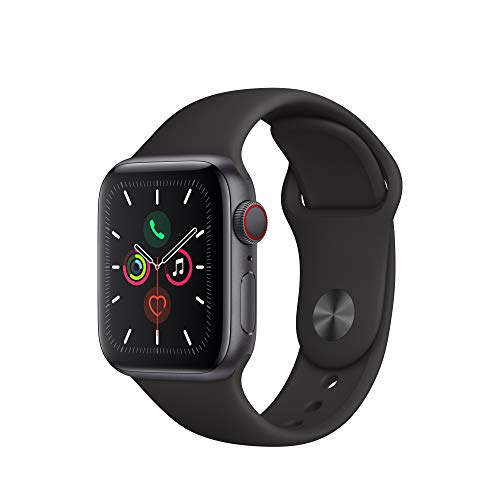
3.Apple Watch Series 5 Cellular 44mm Watch
Built-in cellular lets you call, text and check email without a phone

4.Apple Watch Series 6 Cellular 40mm Watch
GPS and cellular let you call, text and get directions without a phone

5.TEZILON TB0036 4G GPS Smart Watch with SOS
One-touch SOS automatically calls an emergency contact when pressed
1. Matast T60 AMOLED Smartwatch with Calling
Matast helps seniors handle calls and check everyday health and activity readings from their wrist. Its 1.19-inch AMOLED touchscreen has a 390-by-390 resolution and five brightness settings, so you can adjust the display for different lighting.
The built-in microphone and speaker let you make, answer or reject Bluetooth calls, while synced contacts and call history keep useful details on the watch. It also shows notifications from apps such as WhatsApp, Facebook, Gmail, Instagram and SMS.
For daily movement, the watch offers more than 110 sports modes and tracks steps, distance and calories. Its IP68 water-resistance rating suits workouts and rainy walks, according to the product details.
Health features include heart-rate and sleep tracking, with records of deep sleep, light sleep and wake-up time. It also provides SpO2 readings and menstrual-cycle recording, giving users several types of personal data to review.
The FitCloudPro app offers more than 200 watch faces, including options that use a personal photo. Other tools include alarms, a flashlight, calculator, stopwatch, timer, sedentary reminders, phone finding, music control and weather forecasts.
A full charge takes about two and a half hours, and the maker lists up to five days of use or 20 days on standby. It works with iOS 9.0 and Android 9.0 or later, making it a useful choice for seniors who want wrist-based calls, notifications and activity tracking.
- AMOLED screen offers sharp, adjustable viewing
- Bluetooth calling works through its built-in speaker
- More than 110 modes track varied activities
- Five-day battery life suits regular daily wear
- A full charge takes about two and a half hours
2. Apple Watch Series 6 Cellular 40mm Watch
For calls and health checks from the wrist, the Apple Watch Series 6 pairs GPS and cellular connectivity with blood oxygen monitoring. Its built-in sensor measures blood oxygen levels, giving seniors another health metric to check from the watch.
The cellular connection lets the watch work with a mobile network, while GPS supports location tracking. The title does not specify the cellular plan or phone requirements, so buyers should check compatibility with their carrier and existing devices.
Its 40mm size gives the watch a compact face, and the silver aluminum case comes with a white Sport Band. The light watch weighs about 0.1 pounds, which may suit people who prefer a smaller wearable on their wrist.
This is a renewed model, so its condition may differ from a new watch. It runs on Apple’s watch platform, but the supplied details do not identify the software version or list other health, safety or accessibility features.
Seniors who want cellular and GPS in a compact Apple watch may find this model worth considering, especially if blood oxygen readings matter to them. Buyers should confirm carrier compatibility and the renewed unit’s condition before choosing it.
- Cellular and GPS support wrist-based use
- Blood oxygen sensor adds a health metric
- Compact 40mm size with a light build
- Renewed condition may vary from new
3. Apple Watch Series 5 Cellular 44mm Watch
The 44mm display gives seniors a broad view of the time, calls and other information on the Apple Watch Series 5. Its Always-On Retina screen stays visible without a wrist raise or tap, and its viewing area is over 30% larger than the Series 3 display.
Built-in cellular lets you receive calls, send texts and check email without carrying your phone nearby. You can also stream music, podcasts and audiobooks, including Apple Music, or save favorites to the watch for listening.
For health tracking, the optical heart sensor monitors your heart rate and can alert you to high or low readings. The ECG app lets you take a reading similar to a single-lead electrocardiogram from your wrist.
Built-in GPS supports outdoor exercise and Maps navigation, while the compass helps guide your route. The altimeter tracks elevation, and the watch is swimproof for workouts in the water.
Emergency SOS lets you call for help from the watch when your phone is out of reach. International emergency calling connects to local emergency services while you travel abroad.
This 44mm model has a Space Gray aluminum case and a black Sport Band, and weighs about 0.08 pounds. Its combination of cellular access, health features and emergency calling suits seniors who want useful phone functions on their wrist.
- Cellular handles calls and texts away from phones
- Always-on 44mm screen stays visible at a glance
- Heart alerts and wrist-based ECG support monitoring
- Emergency SOS works without a nearby phone
- No major cons
4. Apple Watch Series 6 Cellular 40mm Watch
Seniors who want to make calls or get directions without carrying a phone can use the Apple Watch Series 6 GPS + Cellular. Its cellular connection also lets them send texts while away from their iPhone.
The S6 SiP runs up to 20% faster than the Series 5, helping the watch handle its apps and daily tasks. Its 40mm Always-On Retina display gets 2.5 times brighter outdoors when the wrist is down, making information easier to see outside.
For health checks, the blood oxygen sensor and app measure blood oxygen, while the ECG app checks heart rhythm. These tools offer ways to review health readings from the wrist, though they do not replace guidance from a medical professional.
The watch tracks daily activity and shows trends in the Fitness app on iPhone. It also records running, walking, cycling, yoga, swimming and dance, so seniors can follow a range of workouts.
GPS helps with directions, and 5GHz Wi-Fi and a U1 Ultra Wideband chip round out its wireless features. The swimproof design suits pool workouts, and users can sync music, podcasts and audiobooks for listening.
Its Space Gray aluminum case comes with a Black Sport Band. This Apple Watch suits seniors who want wrist-based calling, health measurements and activity tracking, especially those who use an iPhone.
- Cellular lets you call and text without your phone
- Brighter outdoor display helps you read it outside
- ECG and blood oxygen tools support health checks
- Tracks six workout types, including swimming
- No major cons
5. TEZILON TB0036 4G GPS Smart Watch with SOS
The 1.44-inch screen gives this TEZILON watch a compact fit for everyday wear. Its 4G connection supports two-way voice calls and video calls, so seniors can reach family and see them through the watch.
GPS tracking shares the wearer’s current position with family, and the system keeps location history for up to 90 days. The watch works with Android and iOS, giving relatives a way to check recent routes from either type of phone.
For urgent situations, the wearer can hold the SOS button to call a preset emergency contact. Family can also set a safe area and receive an alert in the phone app if the wearer leaves it.
The watch includes a phone book, voice messages, a camera, a photo album and a flashlight. Alarms and a pedometer add everyday tools, while the 4G network support is useful in the US, according to the product information.
It can be worn while washing hands or playing with water, and Silent Mode can limit interruptions during school hours. Though that setting targets children, the calling, location and SOS features may also help families stay in touch with older relatives.
This black watch suits seniors who want a wearable way to call family and share their location, especially when relatives use Android or iOS phones to check in.
- 4G supports calls and video chats with family
- GPS shares location and saves 90 days of routes
- SOS button calls a preset emergency contact quickly
- Safe-area alerts notify family through the phone app
- No major cons
How to Choose the Best Phone Watches for Seniors
Choosing a phone watch for an older adult means balancing easy calling, readable controls, reliable safety features, and comfort. The right choice also depends on phone access, cellular coverage, health needs, battery habits, and the cost of ongoing service.
| If You Need | Look For | Expect |
|---|---|---|
| Calls without a phone | Cellular service and emergency calling | Monthly plan and shorter battery life |
| Simple daily calling | Large screen and clear menus | Larger case and more weight |
| Help in an emergency | One-touch SOS and contact setup | Alerts need setup and network coverage |
| Location sharing | GPS and caregiver app | Location updates use more power |
| Health tracking | Heart-rate and rhythm features | Not a substitute for medical care |
| Fewer charging interruptions | Longer stated battery life | Fewer always-on features |
| Lower upfront cost | Bluetooth model or renewed device | Phone must stay nearby |
Calling and Connectivity
Decide whether the wearer needs calls when their phone is elsewhere. Bluetooth watches use a nearby paired phone for calls, while cellular models connect to a mobile network independently; that freedom brings a service plan and more charging.
Cellular coverage, carrier support, and watch activation all affect whether independent calling works. Ask the carrier about watch plans, emergency calling, and coverage at home and common destinations, since a cellular label alone does not guarantee service.
For someone who often leaves a phone behind, cellular calling and messaging may justify the added cost. If a phone is usually in a pocket or nearby, Bluetooth calling is simpler and avoids a separate monthly fee.
Emergency Features
A dedicated SOS button or shortcut can make reaching a chosen contact easier during a fall, sudden illness, or moment of confusion. Learn what happens after activation: some watches call contacts, while others also send location alerts.
Set up emergency contacts and practice the steps before relying on them. Confirm whether alerts go to family, emergency services, or both, and whether the watch needs a paired phone, cellular plan, app, or internet connection.
Location sharing and safe-area alerts can help caregivers follow a wearer’s routine, but they need permission, setup, and a compatible phone app. GPS accuracy can vary indoors and around tall buildings, so treat location as helpful context, not a guarantee.
Ease Of Use
A watch that is difficult to read or navigate may go unused, even when it has useful features. Look for large text, clear icons, simple menus, physical buttons, and a touchscreen that responds without precise taps.
Screen size affects both readability and comfort. A larger display gives text and call controls more room, while a smaller case may feel lighter on a narrow wrist; whenever possible, compare case measurements with the wearer’s wrist.
Brightness and contrast help outdoors and in dim rooms, but an always-on screen can use more battery. Adjustable brightness and a clear display suit changing light conditions, while simplified watch faces reduce clutter for people who prefer fewer choices.
Comfort And Fit
Comfort affects whether the watch stays on all day, so consider case weight, thickness, and strap material alongside screen size. A snug fit keeps sensors near the skin, but an overly tight band can irritate or feel restrictive.
Check how easily the band fastens and whether replacement straps are available in a suitable size. Someone with limited hand strength may prefer a simple clasp, while a flexible band can be easier to adjust for swelling.
Phone And App Compatibility
Confirm that the watch works with the wearer’s phone model and operating system before buying. Some watches need a specific phone platform, while others support both major systems; listed minimum software versions can rule out older phones.
Caregiver tools often rely on a companion app, so check which phones can install it and whether multiple family members can access alerts. Also confirm that the wearer or caregiver can complete setup, permissions, and account sign-in.
Battery And Charging
Battery life varies with calling, cellular use, GPS, screen brightness, and health tracking. A stated maximum usually reflects light use, so look for a realistic estimate that includes the features the wearer plans to use each day.
Frequent charging can be a hurdle for anyone who forgets routines or struggles with small cables. Ask how long a full charge takes, whether the charger is easy to connect, and whether overnight charging leaves safety features unavailable.
Health Tracking
Heart-rate, sleep, blood-oxygen, and rhythm features can help users notice patterns, but consumer watches do not replace diagnosis or medical monitoring. Check which measurements the watch actually offers and whether its alerts suit the wearer’s needs.
An ECG feature records an electrical pattern of the heart, while a heart-rate sensor estimates beats per minute. These tools have different purposes, and any concerning reading or symptom deserves advice from a qualified health professional.
Durability And Water Resistance
Water-resistance ratings describe specific test conditions, not unlimited protection. A watch rated for everyday splashes may suit handwashing, while swimming needs a rating that explicitly permits it; avoid assuming all water-resistant models handle showers or pools.
Consider drops, dust, and daily wear as well as water. A metal or reinforced case may better suit an active routine, but added protection can increase weight; a secure band also reduces the chance of losing the watch.
Price And Ongoing Costs
Lower-priced watches often cover basic Bluetooth calls, activity tracking, and notifications, while higher prices may add cellular access, emergency tools, brighter displays, or more health sensors. Pay extra for features the wearer will actually use.
Include the cellular plan, replacement bands, charging accessories, and possible app fees in the total cost. A renewed or older watch can lower the purchase price, but compare its battery condition, return terms, software support, and included warranty.
Setup And Support
A family member may need to pair the watch, install apps, add contacts, enable location sharing, and adjust accessibility settings. Choose a setup process the wearer’s support person can manage, and confirm that help is available when problems arise.
Warranty And Updates
Warranty coverage matters because a damaged screen or failing battery can make a safety-focused device unusable. Read the coverage period, exclusions, return window, and repair process, especially for renewed devices with different terms.
Software updates affect security, compatibility, and access to apps over time. Check the maker’s update policy and confirm that the phone and watch remain supported, since an older model may lose features or stop pairing with newer phones.
Frequently Asked Questions
Do these phone watches need to be plugged in to work?
They’re rechargeable watches, not plug-in phones. The Apple Watch Series 5 and Series 6 cellular models can make calls and send texts without a nearby phone, while the Matast T60 uses Bluetooth calling and the TEZILON TB0036 offers 4G connectivity.
What should I know about the materials and build?
The product details provided don’t specify the case or band materials, so check the individual listings for those details. Consider screen size and fit, especially when choosing between the 40mm Apple Watch Series 6 and 44mm Apple Watch Series 5.
What comes in the box with each watch?
The included accessories aren’t specified in the product details here. Check each listing to confirm whether it includes a charger, band, or other accessories.
Should I choose the Matast T60 or the TEZILON TB0036?
Choose the Matast T60 if you want an AMOLED screen and Bluetooth calling. The TEZILON TB0036 is the better fit if one-touch SOS calling to an emergency contact is your priority.
Which Apple Watch should I choose: Series 5 or Series 6?
Both reviewed models offer cellular features, but the Series 6 listing highlights a blood oxygen sensor, while the Series 5 is a 44mm model with built-in cellular. Compare the features you value and the listed size before choosing.
Can I make calls or send messages without carrying my phone?
The Apple Watch Series 5 and Series 6 cellular models are listed for calling and texting without a phone, and the Series 5 listing also mentions checking email. The Matast T60 uses Bluetooth calling, while the TEZILON TB0036 has 4G connectivity.
How do I get help quickly in an emergency?
The TEZILON TB0036 has a one-touch SOS button that automatically calls an emergency contact when pressed. Set up the contact beforehand and check the watch’s instructions for how SOS works.
So, What Should You Buy?
For most people, the Apple Watch Series 5 Cellular is a practical pick, with calling, texting, and email available without a phone. Choose the Matast T60 for an AMOLED screen and Bluetooth calling, or the Apple Watch Series 6 for blood oxygen insights and cellular GPS.
On a budget, consider whichever reviewed model best fits your price range; for emergency contact access, choose the TEZILON TB0036 and its one-touch SOS. Pick the watch that suits your priorities, and you’ll be ready to stay connected.