

Open the caseback, replace the coin cell, reset, then reseal gasket.
You want a clear, safe, and repeatable way to handle how to change a casio watch battery. I have serviced many Casio models in home shops and pro benches.
In this guide, I share proven steps, expert tips, and real fixes. You will learn how to change a casio watch battery without harming the module or the water seal.

Tools and parts you will need
Gather the right tools before you start. This cuts risk and saves time. It also protects fragile parts like the coil and gasket.
- Small Phillips screwdriver and flat driver sized for watch screws
- Caseback tool for screw-back cases or a case knife for snap-backs
- Plastic or non-magnetic tweezers for handling the battery
- Fine-tip metal tweezers for short “AC” reset when needed
- Loupe or bright desk light for clear vision
- Spring bar tool to remove the strap if it blocks the caseback
- Soft mat or microfiber cloth and a small parts tray
- 100% silicone grease for the gasket, plus a spare gasket if worn
- Isopropyl alcohol and lint-free swabs to clean the seal groove
- Correct battery cell for your module
Tip from experience: lay screws in the shape of the caseback. That way, each one goes back to the same hole. This small habit makes how to change a casio watch battery less stressful and more exact.
Safety and warranty considerations
Work slowly and in good light. Static, dust, or a slipped tool can ruin a module. If your watch is under warranty, check terms. Opening the back may void water resistance guarantees.
- Power down alarms and note the time to speed re-setup later
- Avoid metal tools near the hair-thin coil; one scratch can kill it
- Do not touch the battery or contacts with bare fingers
- Keep the gasket clean and free of lint or fibers
- If you dive or swim often, plan a pressure test after the job
Knowing how to change a casio watch battery is only half the task. Keeping the seal sound is just as vital.

Identify your Casio model and battery type
Flip the watch and note two items on the back. The module number is a 3–4 digit code in a box. The case code sits nearby. The module number tells you the battery type and reset steps.
Common battery types I see often:
- CR2016 in many G‑Shock and digital models
- CR2025 or CR2032 in larger digitals and Pro Trek styles
- SR626SW (377), SR621SW (364), SR920SW (371) in analog models
- CTL1616 or ML2016 in Tough Solar rechargeable models
Check your module manual for the exact part. This simple check is key to how to change a casio watch battery without guesswork.
Step-by-step: how to change a Casio watch battery at home
Follow these steps with care. I use the same flow at the bench. It keeps small parts safe and the seal clean.
- Prepare the work area. Lay a clean cloth, set up bright light, and wash your hands.
- Remove the strap if it blocks the back. Use a spring bar tool and set bars aside.
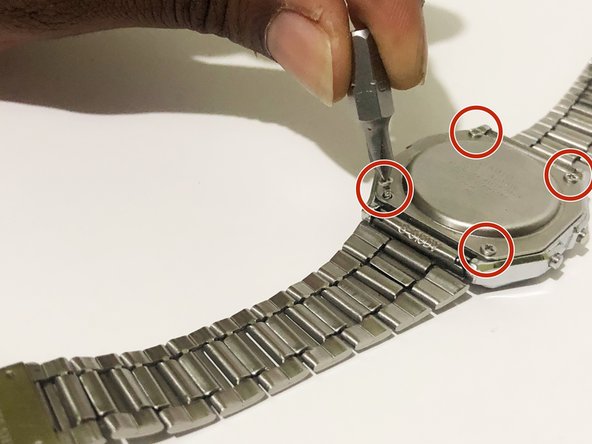
- Open the caseback. Remove four screws on many Casio backs. For screw-backs, use a case opener. For snap-backs, use a thin case knife at the notch.
- Lift and inspect the gasket. If dry, cracked, or misshaped, replace it. Set it in a dust-free spot.
- Note the battery clamp. Many modules have a spring clip or tiny screw holding the cell. Photograph the layout before moving anything.
- Remove the clamp. Use the right driver. Do not let the screw jump into the movement.
- Extract the battery with plastic tweezers. Check polarity and orientation.
- Clean the contact ring gently. A dry swab is enough. Do not bend the contact leaf.
- Insert the new cell. Match polarity. Seat the clamp and tighten lightly. Do not over-torque.
- Perform the AC reset if needed. Many Casio digital modules need it. Bridge the pad marked AC to the battery positive for one to two seconds with fine tweezers. The display should clear to 12:00 or all segments.
- Test functions. Cycle modes, check the alarm, backlight, and hands on analog models.
- Grease the gasket. Use a tiny film of silicone grease, then reseat it in the groove.
- Close the caseback. Align, tighten screws in a cross pattern, and stop when snug.
- Refit the strap. Check spring bars for firm clicks.
If you learn how to change a casio watch battery once, this process becomes quick and calm. My average time for a basic digital is 15 minutes.
Special cases and model notes
Casio designs vary. Small details can change your steps. Here are the ones that matter most.
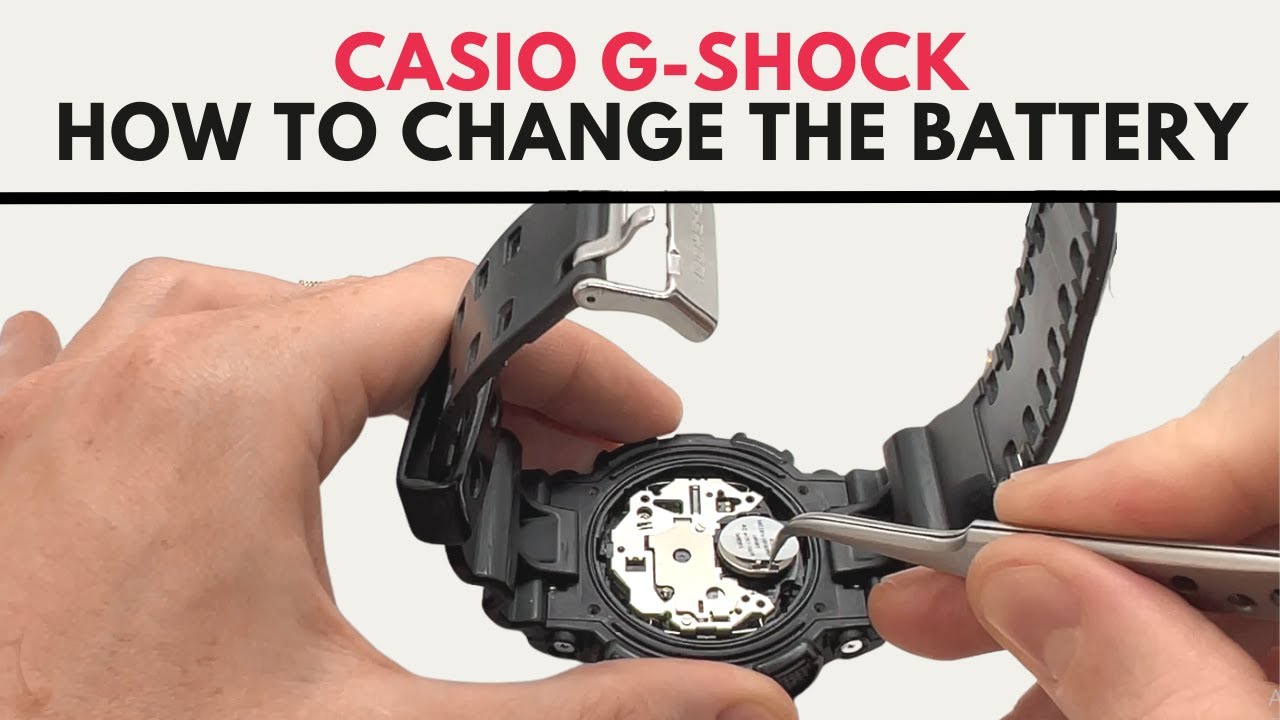
- G‑Shock with resin bezel. Some models have case guards or foam rings inside. Lift them in order and note their orientation. Take a photo before each layer.
- Analog or analog‑digital modules. The battery sits under a thin metal bridge. Some bridges have a tab that slides rather than unscrews. Do not pry hard.
- Tough Solar models. Do not install a standard CR cell. Use the correct rechargeable cell like CTL1616. After install, give the dial strong light for a few hours. Many modules need an All Reset and then a hand re-sync.
- Screw‑down crowns. Make sure the crown threads start clean. Cross-threading ruins water resistance.
- Metal bracelets. Tape the lugs to avoid scratches as you open the case.
These tips can save you from the most common pitfalls when learning how to change a casio watch battery on various models.

Test, reseal, and restore water resistance
A good seal matters more than a fast change. Take a minute to inspect the whole gasket path.
- Check the gasket for nicks, flattening, or swelling
- Clean the groove and caseback lip with a dry swab
- Apply a thin film of silicone grease, not blobs
- Tighten screws in an X pattern to spread pressure
Home tests are limited. If you swim or dive, ask a watch shop for a pressure test. This is the best way to finish how to change a casio watch battery without giving up water resistance.

Troubleshooting and common mistakes
Small errors can cause blank screens or fast drain. These fixes come from real benches, not guesswork.
- Blank display after install. Do the AC reset. Check that the battery touches both contacts.
- Mode button dead. Clean button contacts and ensure the caseback spring contacts align with pads.
- Analog hands not moving. Confirm the coil is intact. Reseat the battery and bridge. Check for a thin plastic insulator you forgot to replace.
- Time resets when you press light. The clamp is loose. Tighten gently and clean contacts.
- Fog under crystal. The seal failed. Open, dry with silica gel, replace the gasket, and pressure test.
When you know how to change a casio watch battery well, these issues are rare. But it helps to have a plan.
Time, cost, and eco-friendly disposal
Most basic jobs take 10–20 minutes. G‑Shock or solar models may take longer. Set aside extra time for careful cleaning.
- DIY cost is low. A coin cell is a few dollars. A gasket costs a bit more.
- Shop prices vary. Simple analog changes can be modest. G‑Shock and pressure tests cost more due to seals and time.
- Recycle old cells. Use battery drop boxes at stores or city sites. Never toss batteries in household trash.
If budget matters, learn how to change a casio watch battery once. Your tools pay for themselves in a few changes.

Maintenance tips to extend battery life
Good habits stretch the time between changes. They also protect gaskets and buttons.
- Turn off hourly chimes and unused alarms
- Limit backlight use and lower its duration if your module allows
- Keep away from heat, strong magnets, and solvents
- Rinse after saltwater and dry before storing
- For solar, give the dial regular light to stay charged
These simple steps support any plan for how to change a casio watch battery less often and with less stress.
Frequently Asked Questions of how to change a casio watch battery
How do I know which battery my Casio needs?
Check the module number on the back, then look up the battery type in the manual. You can also compare the old cell’s code if it is readable.
Do all Casio watches need an AC reset after a battery change?
Many digital modules do, and the AC pad is marked inside. Bridging AC to the battery positive clears the module and restores normal function.
Can I keep water resistance after a DIY battery change?
Yes, if the gasket is clean, greased, and in good shape. For swimming or diving, get a professional pressure test after you reseal.
What if my Casio is Tough Solar?
Use the exact rechargeable cell, not a standard coin cell. Charge under strong light after install and perform the required reset steps.
How often will I need to change the battery?
Most non-solar Casio batteries last 2–5 years depending on alarms and backlight use. Heavy features shorten life; careful settings extend it.
Is it safe to use metal tweezers on the battery?
Use plastic tweezers for the cell to avoid shorts. Fine metal tweezers are only for the brief AC reset, with a steady hand.
Conclusion
You can replace a Casio battery with calm, clear steps, the right tools, and a focus on the gasket. Identify your module, install the correct cell, perform the reset, and seal it right. With practice, how to change a casio watch battery becomes a quick, confident routine.
Try this method on a simple model first, and log your steps and settings. When you are ready, tackle more complex models or seek a pressure test for water sports. If this guide helped, share it, subscribe for more repair tips, or leave a question and I will help you solve it.